
登录功能
2024年10月31日大约 3 分钟
登录功能
在日常生活中,扫码登录是个很普遍通用的功能,这里我使用微信公众号平台提供的 API 接口,做微信公众号扫码登录。
微信公众号测试平台:https://mp.weixin.qq.com/debug/cgi-bin/sandboxinfo?action=showinfo&t=sandbox/index
登录流程
- 申请扫码登录权限:在微信开放平台申请扫码登录权限。
- 生成二维码:使用微信提供的接口生成一个包含应用授权信息的二维码。
- 用户扫码授权:用户扫描二维码,授权登录。
- 获取授权码:用户授权后,微信会回调给开发者一个授权码。
- 获取用户信息:使用授权码获取用户的基本信息(如昵称、头像等)。
- 存储信息: 将微信返回的用户唯一标识与后端token绑定存储,后续只需校验token即可。
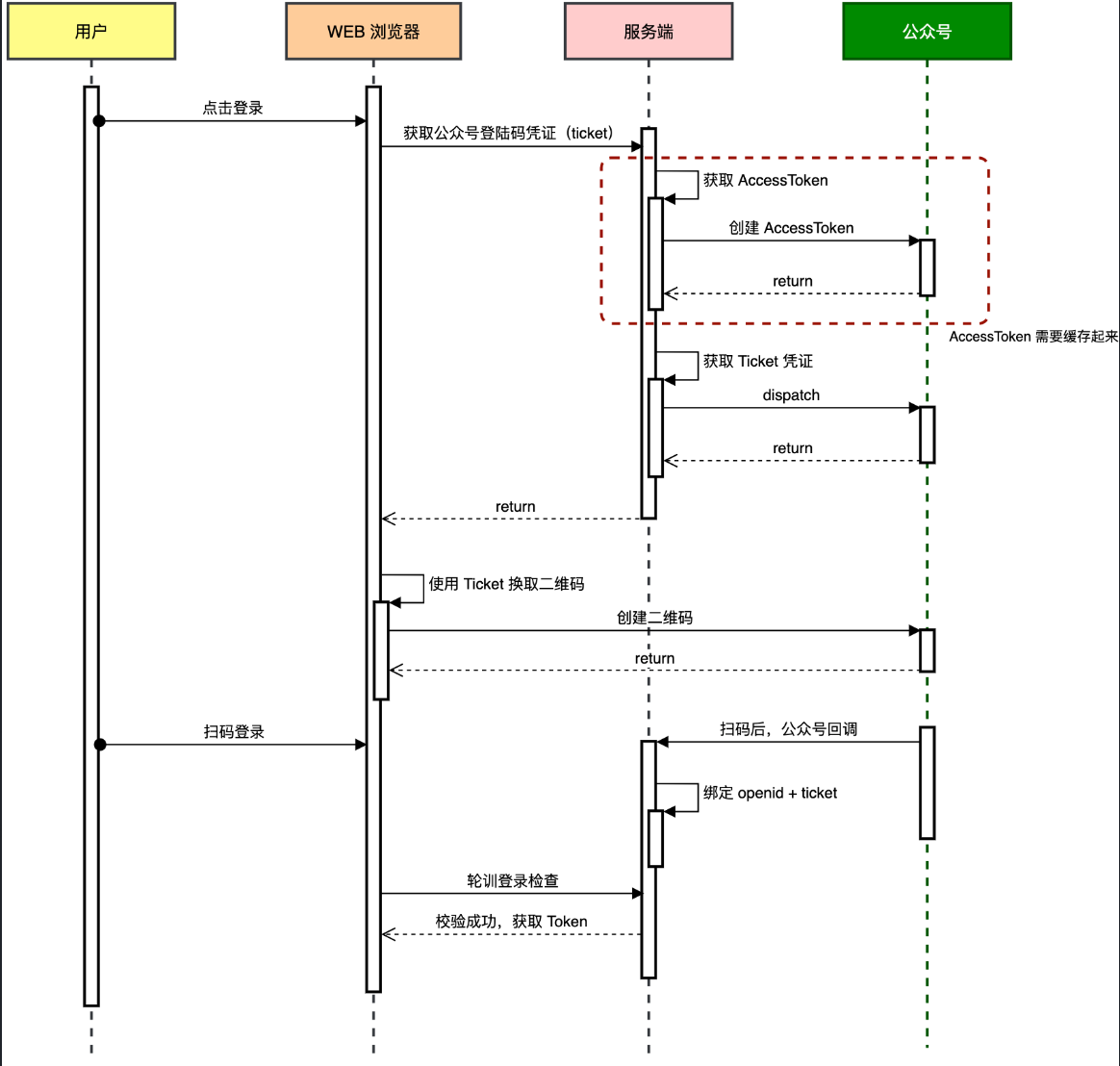
功能实现
构建微信请求
这里我采用retrofit2 来构建网络请求调用微信接口
public interface IWeixinApiService {
    @GET("cgi-bin/token")
    Call<WeixinTokenRes> getToken(@Query("grant_type") String grantType,
                                  @Query("appid") String appId,
                                  @Query("secret") String appSecret);
    @POST("cgi-bin/qrcode/create")
    Call<WeixinQrCodeRes> createQrCode(@Query("access_token") String accessToken, @Body WeixinQrCodeReq weixinQrCodeReq);
    @POST("cgi-bin/message/template/send")
    Call<Void> sendMessage(@Query("access_token") String accessToken, @Body WeixinTemplateMessageVO weixinTemplateMessageVO);
}
- getToken;获取 accesstoken,用于调用其他接口时使用。
- createQrCode;获取登录凭证,使用这个凭证获取微信二维码。
- sendMessage;发送微信公众号模板消息。
然后实例化接口,这里我把他注册成Bean交给spring管理方便后续注入使用,IWeixinApiService 是接口,实例化的过程是代理操作。。
@Slf4j
@Configuration
public class Retrofit2Config {

    private static final String BASE_URL = "https://api.weixin.qq.com/";

    @Bean
    public Retrofit retrofit() {
        return new Retrofit.Builder()
                .baseUrl(BASE_URL)
                .addConverterFactory(JacksonConverterFactory.create()).build();
    }

    @Bean
    public IWeixinApiService weixinApiService(Retrofit retrofit) {
        return retrofit.create(IWeixinApiService.class);
    }

}
获取登录凭证
@Service
public class WeixinLoginServiceImpl implements ILoginService {

    @Value("${weixin.config.app-id}")
    private String appid;
    @Value("${weixin.config.app-secret}")
    private String appSecret;
    @Value("${weixin.config.template_id}")
    private String template_id;

    @Resource
    private Cache<String, String> weixinAccessToken;
    @Resource
    private IWeixinApiService weixinApiService;
    @Resource
    private Cache<String, String> openidToken;

    @Override
    public String createQrCodeTicket() throws Exception {
        // 1. 获取 accessToken
        String accessToken = weixinAccessToken.getIfPresent(appid);
        if (null == accessToken) {
            Call<WeixinTokenRes> call = weixinApiService.getToken("client_credential", appid, appSecret);
            WeixinTokenRes weixinTokenRes = call.execute().body();
            assert weixinTokenRes != null;
            accessToken = weixinTokenRes.getAccess_token();
            weixinAccessToken.put(appid, accessToken);
        }

        // 2. 生成 ticket
        WeixinQrCodeReq weixinQrCodeReq = WeixinQrCodeReq.builder()
                .expire_seconds(2592000)
                .action_name(WeixinQrCodeReq.ActionNameTypeVO.QR_SCENE.getCode())
                .action_info(WeixinQrCodeReq.ActionInfo.builder()
                        .scene(WeixinQrCodeReq.ActionInfo.Scene.builder()
                                .scene_id(100601)
                                .build())
                        .build())
                .build();

        Call<WeixinQrCodeRes> call = weixinApiService.createQrCode(accessToken, weixinQrCodeReq);
        WeixinQrCodeRes weixinQrCodeRes = call.execute().body();
        assert null != weixinQrCodeRes;
        return weixinQrCodeRes.getTicket();
    }

    @Override
    public String checkLogin(String ticket) {
        return openidToken.getIfPresent(ticket);
    }

    @Override
    public void saveLoginState(String ticket, String openid) throws IOException {
        openidToken.put(ticket, openid);

        // 1. 获取 accessToken 【实际业务场景,按需处理下异常】
        String accessToken = weixinAccessToken.getIfPresent(appid);
        if (null == accessToken){
            Call<WeixinTokenRes> call = weixinApiService.getToken("client_credential", appid, appSecret);
            WeixinTokenRes weixinTokenRes = call.execute().body();
            assert weixinTokenRes != null;
            accessToken = weixinTokenRes.getAccess_token();
            weixinAccessToken.put(appid, accessToken);
        }

        // 2. 发送模板消息
        Map<String, Map<String, String>> data = new HashMap<>();
        WeixinTemplateMessageVO.put(data, WeixinTemplateMessageVO.TemplateKey.USER, openid);

        WeixinTemplateMessageVO templateMessageDTO = new WeixinTemplateMessageVO(openid, template_id);
        templateMessageDTO.setUrl("https://wyqjishu.us.kg");
        templateMessageDTO.setData(data);

        Call<Void> call = weixinApiService.sendMessage(accessToken, templateMessageDTO);
        call.execute();

    }

}
三个接口一个获取登录凭证,一个校验是否登录,一个保存登录状态。
登录流程
后续只需要调用接口,拿到凭证后调用微信接口换取对应二维码展示给用户,然后轮询调用接口是否登录。
@PostMapping(value = "receive", produces = "application/xml; charset=UTF-8")
public String post(@RequestBody String requestBody,
                   @RequestParam("signature") String signature,
                   @RequestParam("timestamp") String timestamp,
                   @RequestParam("nonce") String nonce,
                   @RequestParam("openid") String openid,
                   @RequestParam(name = "encrypt_type", required = false) String encType,
                   @RequestParam(name = "msg_signature", required = false) String msgSignature) {
    try {
        log.info("接收微信公众号信息请求{}开始 {}", openid, requestBody);
        // 消息转换
        MessageTextEntity message = XmlUtil.xmlToBean(requestBody, MessageTextEntity.class);
        if ("event".equals(message.getMsgType()) && "SCAN".equals(message.getEvent())) {
            loginService.saveLoginState(message.getTicket(), openid);
            return buildMessageTextEntity(openid, "登录成功");
        }
        return buildMessageTextEntity(openid, "你好," + message.getContent());
    } catch (Exception e) {
        log.error("接收微信公众号信息请求{}失败 {}", openid, requestBody, e);
        return "";
    }
}
用户登陆后微信会向提前设置地网址发送回调请求,这里通过openid判断是否登录成功,如果登录成功,调用保存登录状态接口,保存用户信息,最后调用模板消息接口,发送微信公众号模板消息。